
Six months ago, I caused a minor incident. I shipped a prompt update to our customer support bot that worked perfectly in the playground. It passed my local tests. It looked great in the UI. But three hours after the deploy, our observability dashboard started screaming. The model began returning markdown when our parser expected raw JSON. The parser threw an exception, the retry logic kicked in, we hit our rate limits, and the whole service ground to a halt. We had to do a manual rollback at 2 AM.
This is why prompt engineering for real work is not about finding the perfect magic word. It is about building a predictable interface for a non-deterministic component. If you treat a prompt like a creative writing exercise, you will eventually break your production environment. If you treat it like a technical spec, you might actually build something that scales.
What you will have at the end
By following this guide, you will move away from trial-and-error prompting. You will have a system for structured outputs, a testing strategy that catches regressions before they hit production, and a clear understanding of the latency trade-offs between different models. You will know how to use Claude for complex reasoning tasks while maintaining a strict schema that your backend can actually parse without crashing.
Prerequisites
You need an API key for a modern LLM provider. I suggest using Groq if you care about speed or Hugging Face if you want to experiment with open-source models like Llama 3. You should also have a basic understanding of JSON schema and a testing framework like Pytest or Vitest. We are going to write code, not just chat with a bot.
Step 1: Define the schema first, write the prompt second
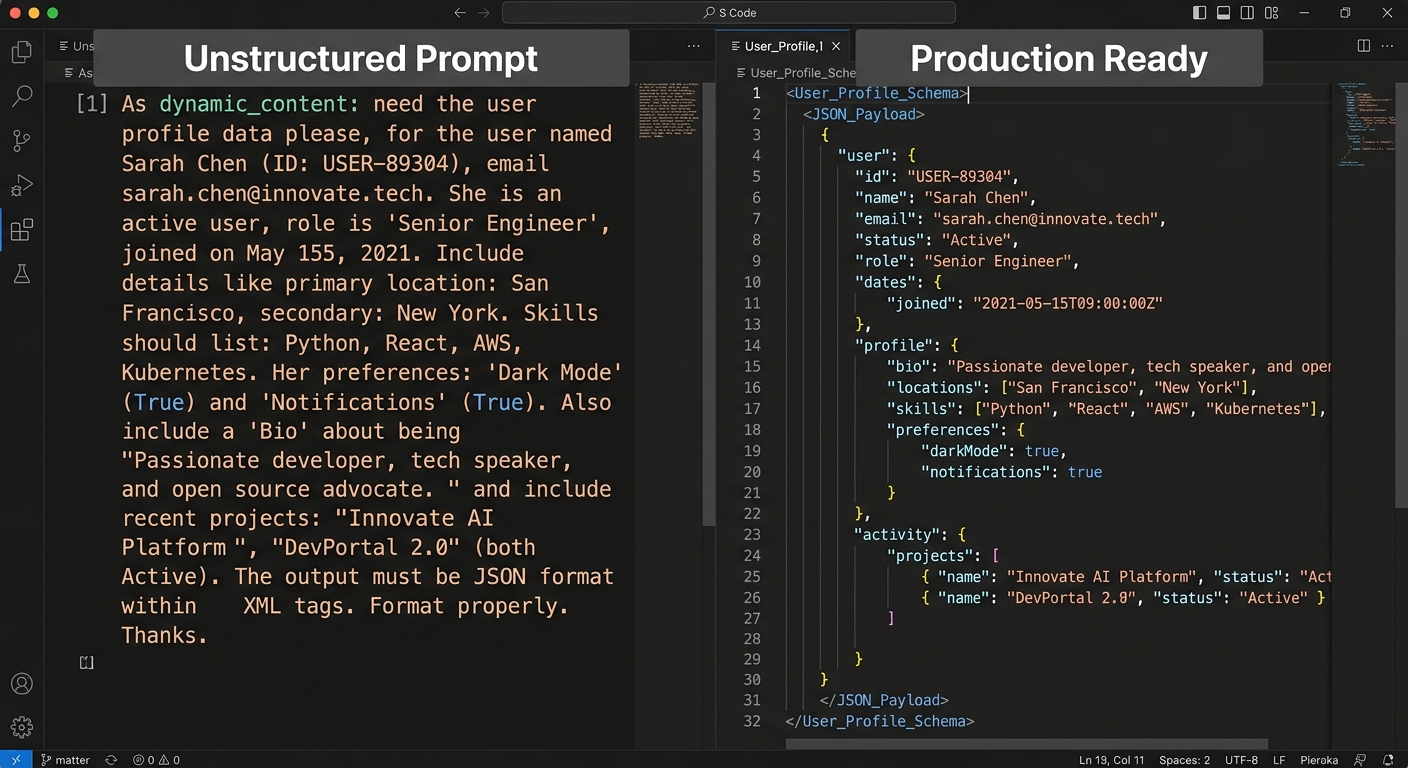
The biggest mistake engineers make is writing a long paragraph of instructions and then adding 'please return JSON' at the end. That is a recipe for a flaky service. If your prompt does not define the exact keys and types you expect, the model will eventually hallucinate a new field or change a snake_case key to camelCase.
Start with a Pydantic model or a JSON schema. This is your contract. Use this contract to drive the prompt. If you are using Claude, you can use XML tags to wrap your schema, which helps the model distinguish between instructions and data structures.
from pydantic import BaseModel, Field
from typing import List

class TechnicalAudit(BaseModel):
 vulnerabilities: List[str] = Field(description='List of CVE IDs or security risks')
 severity_score: int = Field(ge=0, le=10, description='Risk score from 0 to 10')
 remediation_steps: str = Field(description='Markdown formatted fix instructions')

# This schema is your prompt foundation
print(TechnicalAudit.model_json_schema())
When you build your prompt, include the schema directly. Tell the model that any deviation from this schema is a failure. This approach makes your prompt a piece of documentation rather than a wishlist. For more on how to use AI for structured technical tasks, check out our guide on writing PRDs with AI: technical audit.
Step 2: Implement few-shot examples as unit tests
Zero-shot prompting (just giving instructions) is fragile. If you want the model to handle edge cases, you have to show it those edge cases. I treat few-shot examples like unit tests for my prompt. I include one 'happy path' example and at least two 'error' examples where the model should refuse to answer or return a specific error code.
If you are using ChatGPT, the system prompt is the place for these examples. Here is how I structure a few-shot block for a code review tool:
User: Review this Python code: print('hello')
Assistant: {"status": "pass", "comments": "Simple print statement. No issues."}
User: Review this Python code: eval(user_input)
Assistant: {"status": "fail", "comments": "Security risk: use of eval() on untrusted input."}
By providing these pairs, you reduce the likelihood of the model going off the rails when it encounters something it has not seen before. This is especially important when you are trying to avoid regressions. In our post-mortem of failed code review automation, we found that 80% of our failures came from not providing enough negative examples in the few-shot context.
Step 3: Build an evaluation pipeline
You cannot manage what you do not measure. In standard software engineering, we have CI/CD. In prompt engineering for real work, we have evals. An eval is just a script that runs your prompt against a dataset of 50 to 100 inputs and checks if the output matches your expected schema and quality bar.
Do not manually check the outputs. Use a library or a simple script to validate the JSON against your schema. If you are using Groq for inference, the latency is low enough that you can run these evals in parallel during your build process. If a change to the prompt causes the pass rate to drop from 98% to 92%, that is a regression. You do not ship that change.
| Metric | Target | Why it matters |
|---|---|---|
| Schema Validity | 100% | Prevents parser crashes and 500 errors |
| Latency (p95) | < 2s | Essential for user experience and backpressure management |
| Accuracy | > 90% | Ensures the 'real work' is actually correct |
| Token Cost | < $0.01/call | Keeps the unit economics of the feature sustainable |
Troubleshooting
Even with a great prompt, things will go wrong. The most common issue is the model hitting a token limit mid-response, which results in truncated JSON. This is why observability is non-negotiable. You need to log the raw response from the LLM before you attempt to parse it. If the JSON is malformed, log the exact string and the prompt version used.
Another issue is 'flaky' prompts that work 9 times out of 10. This usually happens when the prompt is too long or has conflicting instructions. If you see this, simplify. Remove the adjectives. Instead of saying 'Be a helpful assistant that provides very detailed and thorough technical feedback,' say 'Provide technical feedback.' The model performs better when the signal-to-noise ratio is high.
If you experience high latency, consider a smaller model. Sometimes a fine-tuned Llama 3 on Hugging Face can outperform a massive model like GPT-4 for specific, narrow tasks while being 10x faster and cheaper.
Next steps
Once your prompt is stable, put it behind a feature flag. Never roll out a prompt change to 100% of your users at once. Use a canary release. Monitor your error rates. If you see a spike in 'failed to parse JSON' errors, hit the kill switch and investigate the logs.
To see how this works in a production marketing context, read our piece on AI ad copy generation workflow and the feedback loop. It shows how to connect these prompt engineering principles to actual business metrics.
Your final test: Run your prompt through a script 100 times. If it fails to return valid JSON even once, it is not ready for production. Go back to Step 1 and tighten your schema constraints. Real work requires real reliability, not just clever words.


